 Lab Mate
New for iPhone, iPad and Android
Blood work you can finally read
Lab Mate records your lab results, places every single one in its reference range and shows you how it moves over time — explained in plain language, without the medical jargon.
- GDPR-compliant
- Servers & AI in Germany
- Not a diagnosis — just clarity

These samples become
- Cholesterol (total)210mg/dLToo high
- Vitamin D (25-OH)18ng/mLToo low
- HbA1c5.2%Optimal
The problem
A lab report is a table full of abbreviations
Numbers, units, reference ranges in brackets — and the one question nobody answers: is that good or bad?
What the report says
Nobody has ever had this properly explained to them at the surgery.
What Lab Mate shows
Every value with colour, symbol and plain words — and the range it ought to be in.
A look inside
This is Lab Mate on your phone
Real screenshots from the app — no staged mock-ups.
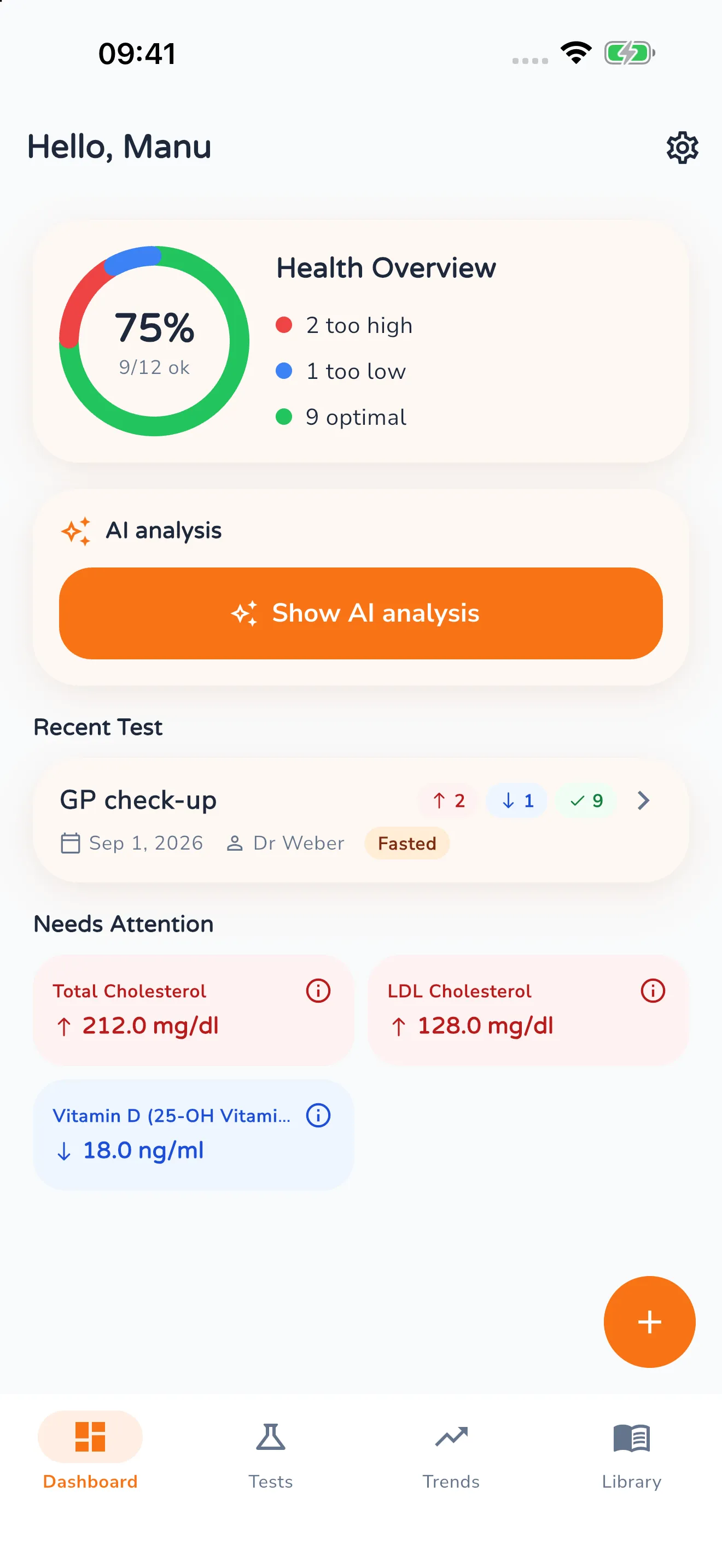
Overview
Your health overview, the latest test and every value needing attention at a glance.
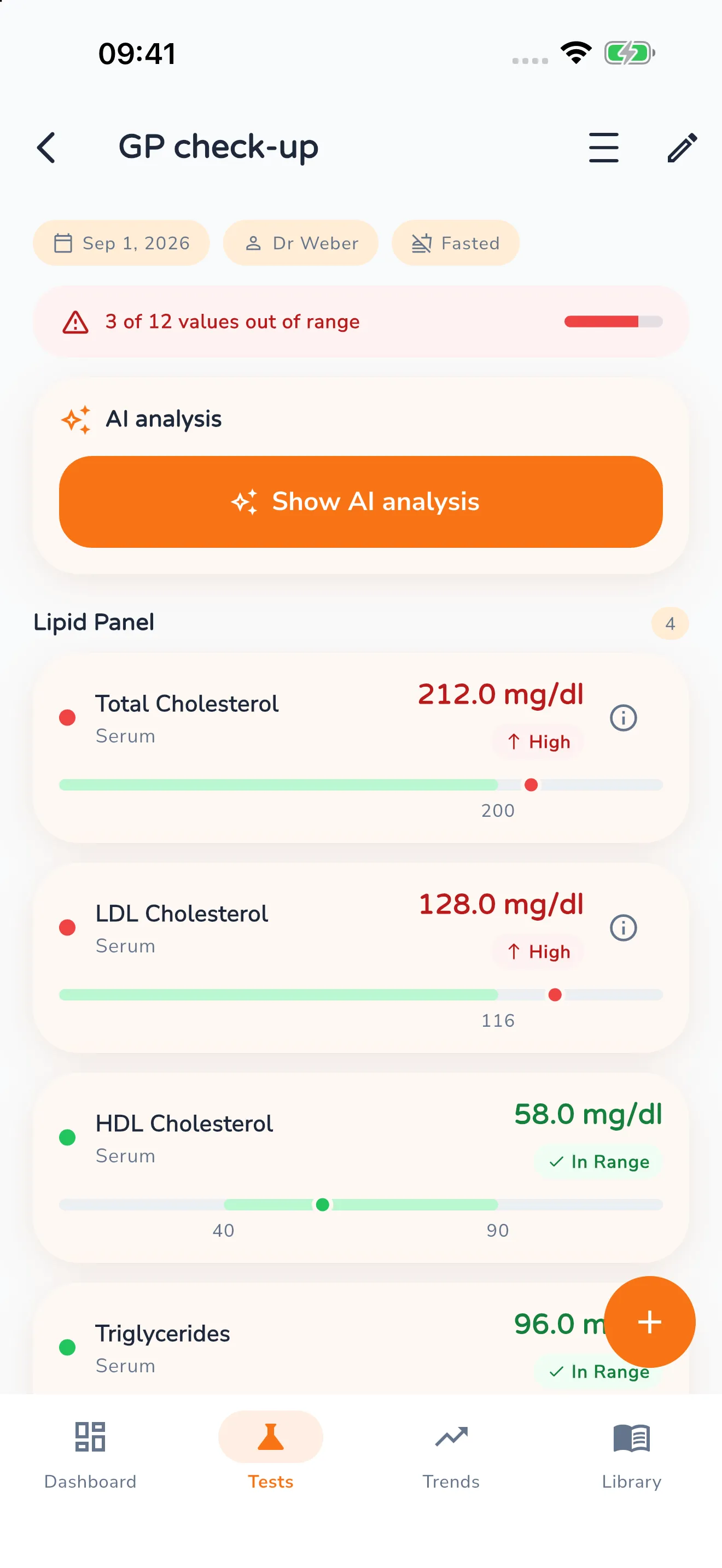
One test in detail
Every blood test as its own entry – sorted into groups, each value with a reference bar.
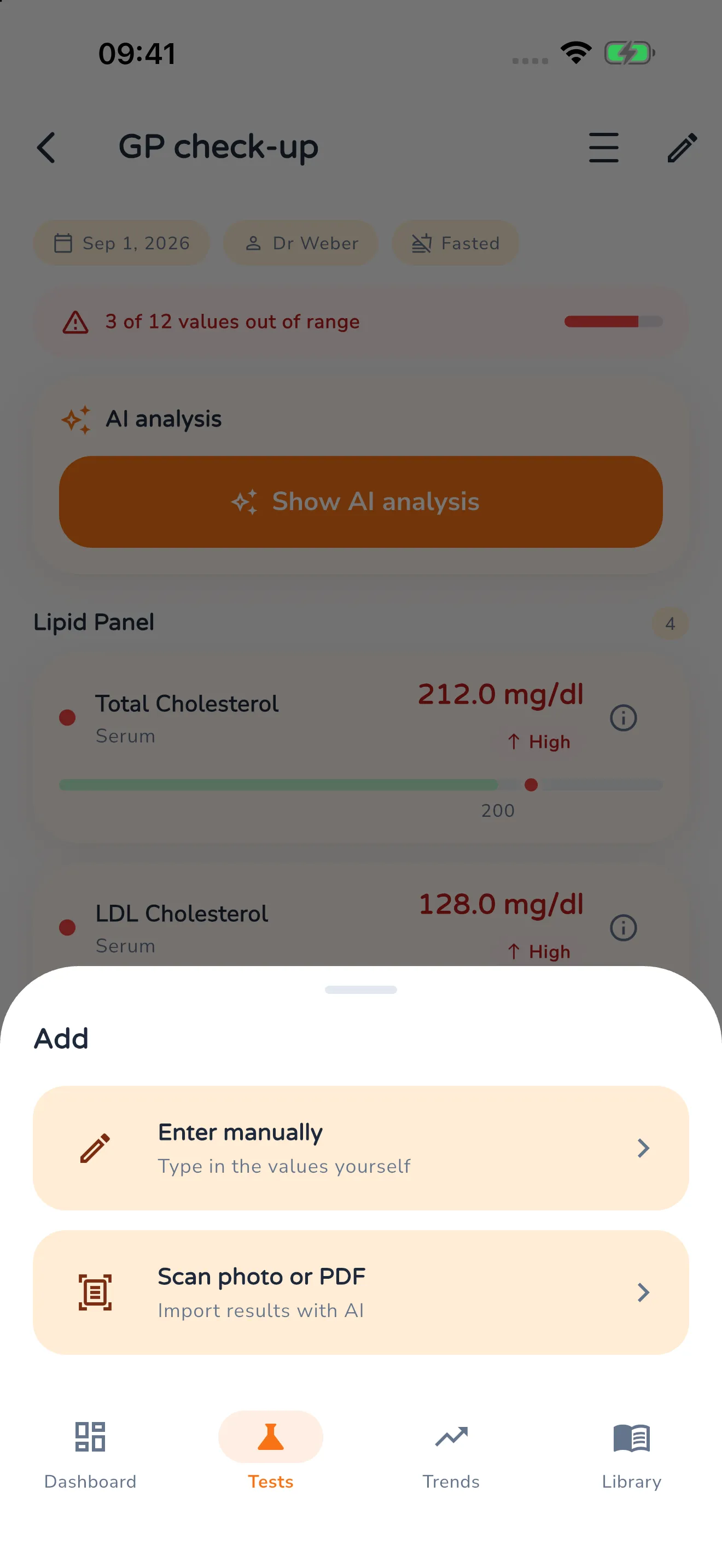
Recording values
Two ways in: type them yourself, or scan a photo or PDF of the report.
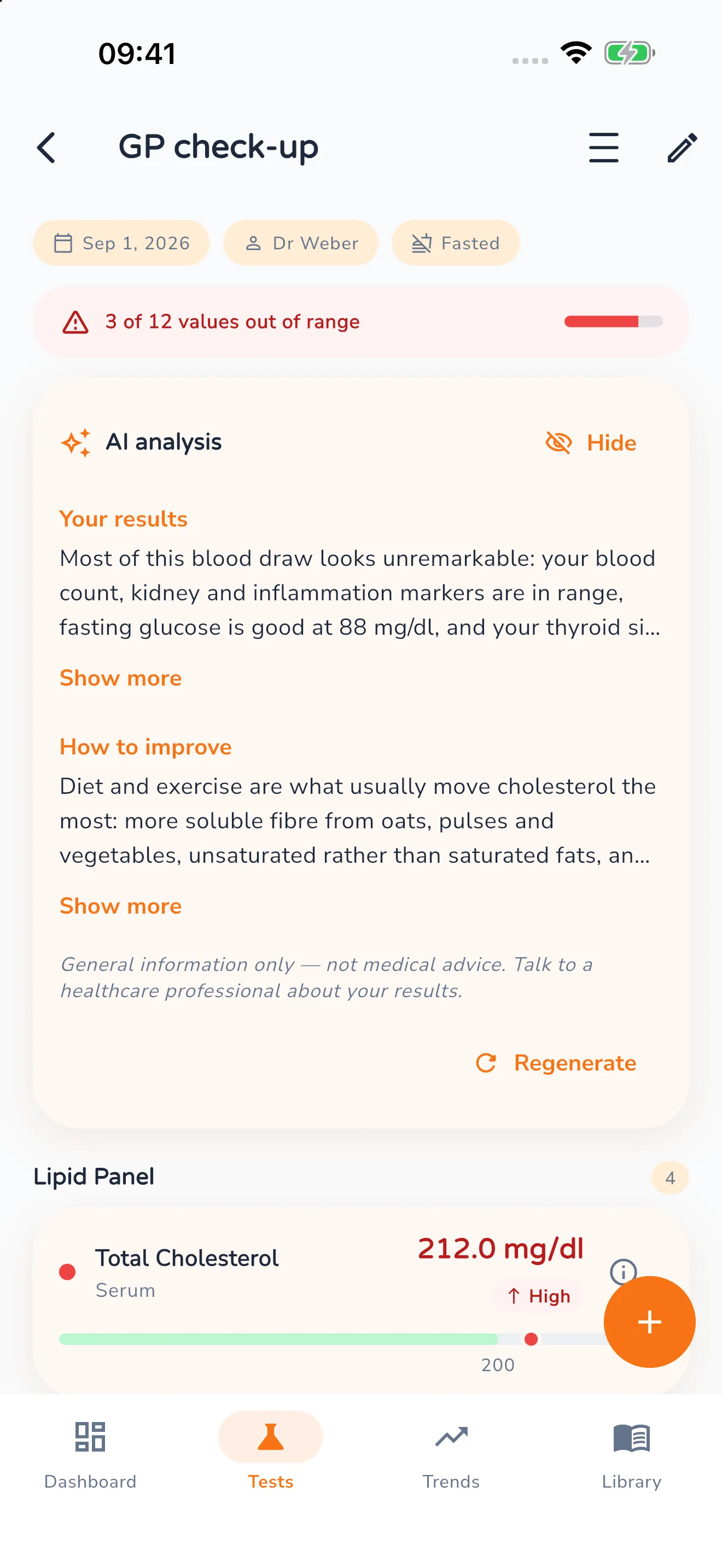
AI analysis
Your results in plain words – with the note that this is no diagnosis.
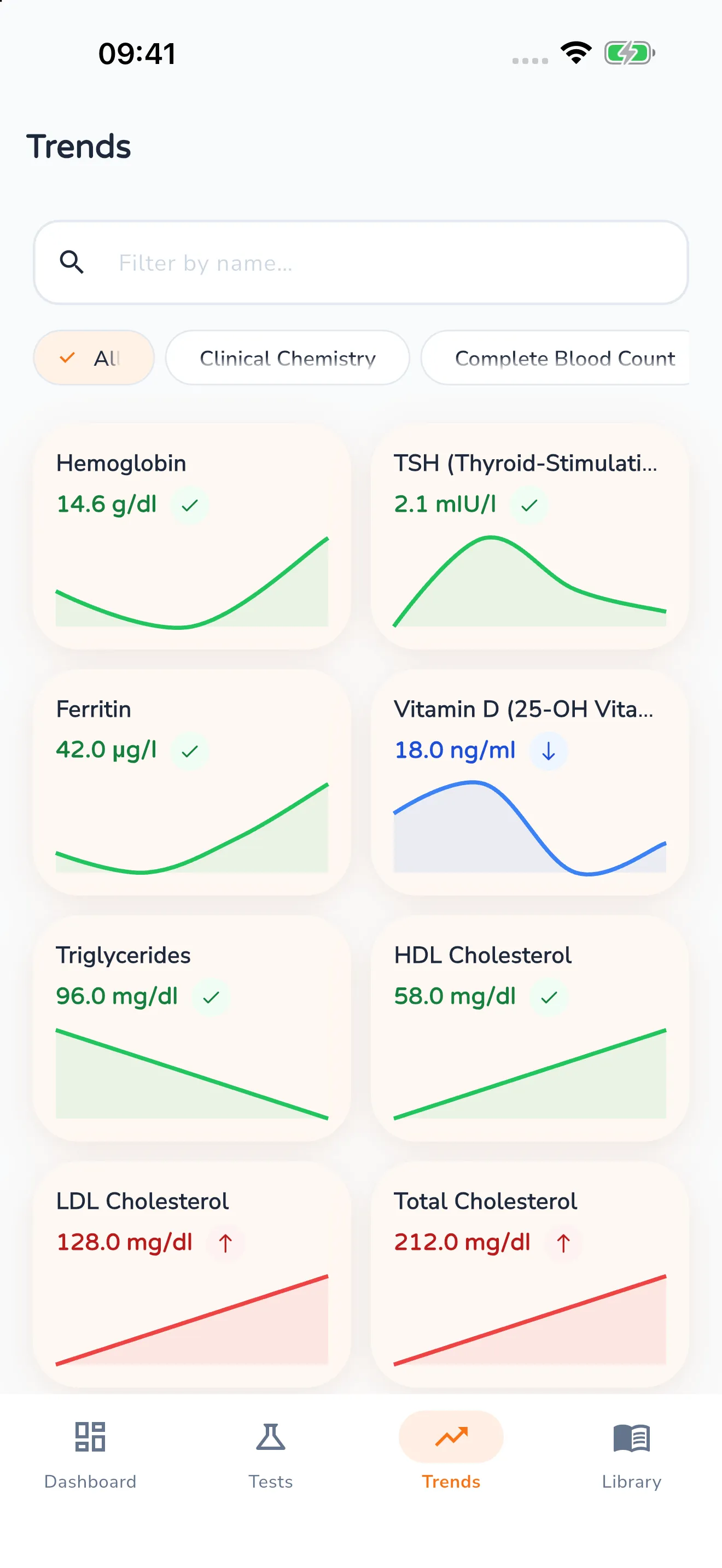
Trends
Each value as its own curve – coloured by whether it sits inside the range.
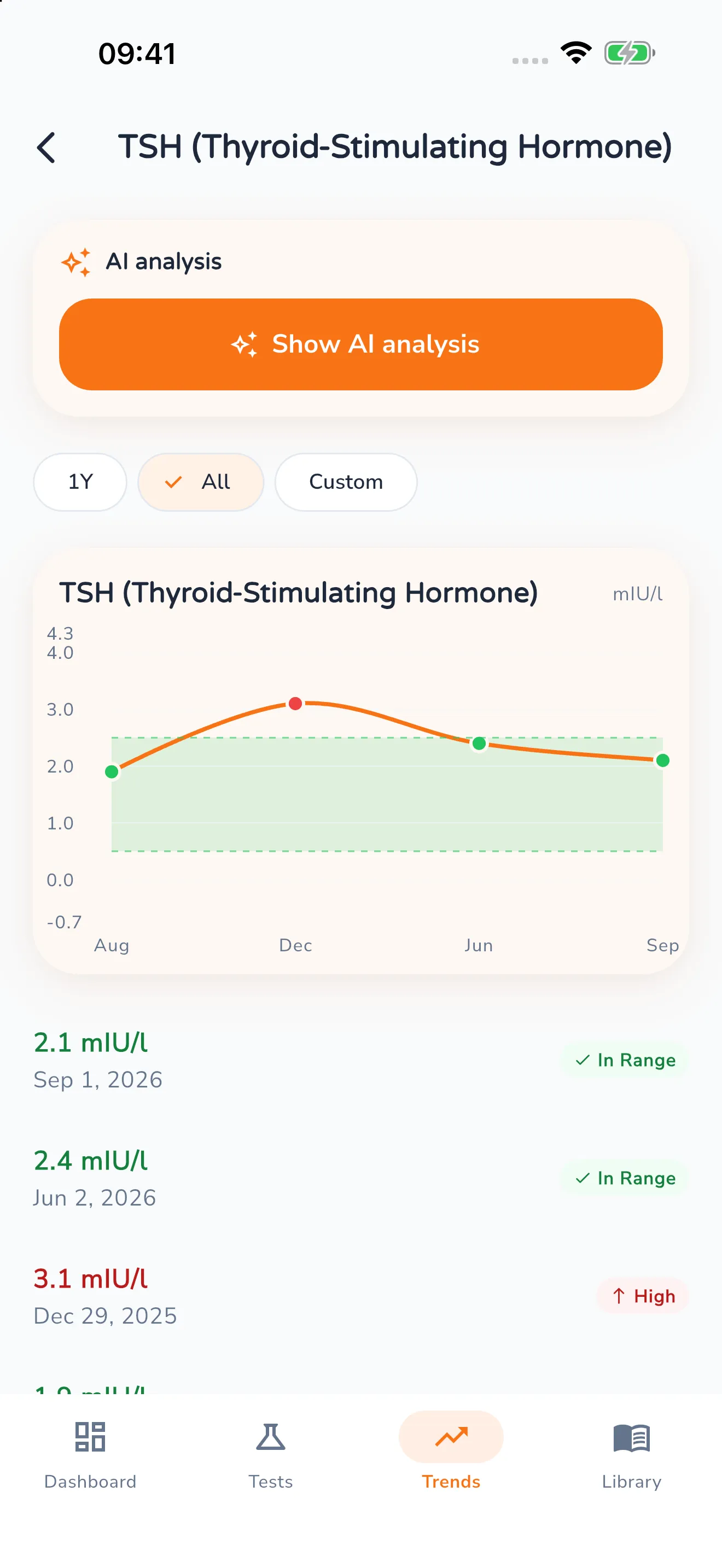
One value over time
The curve with the normal range behind it – and every single measurement below.
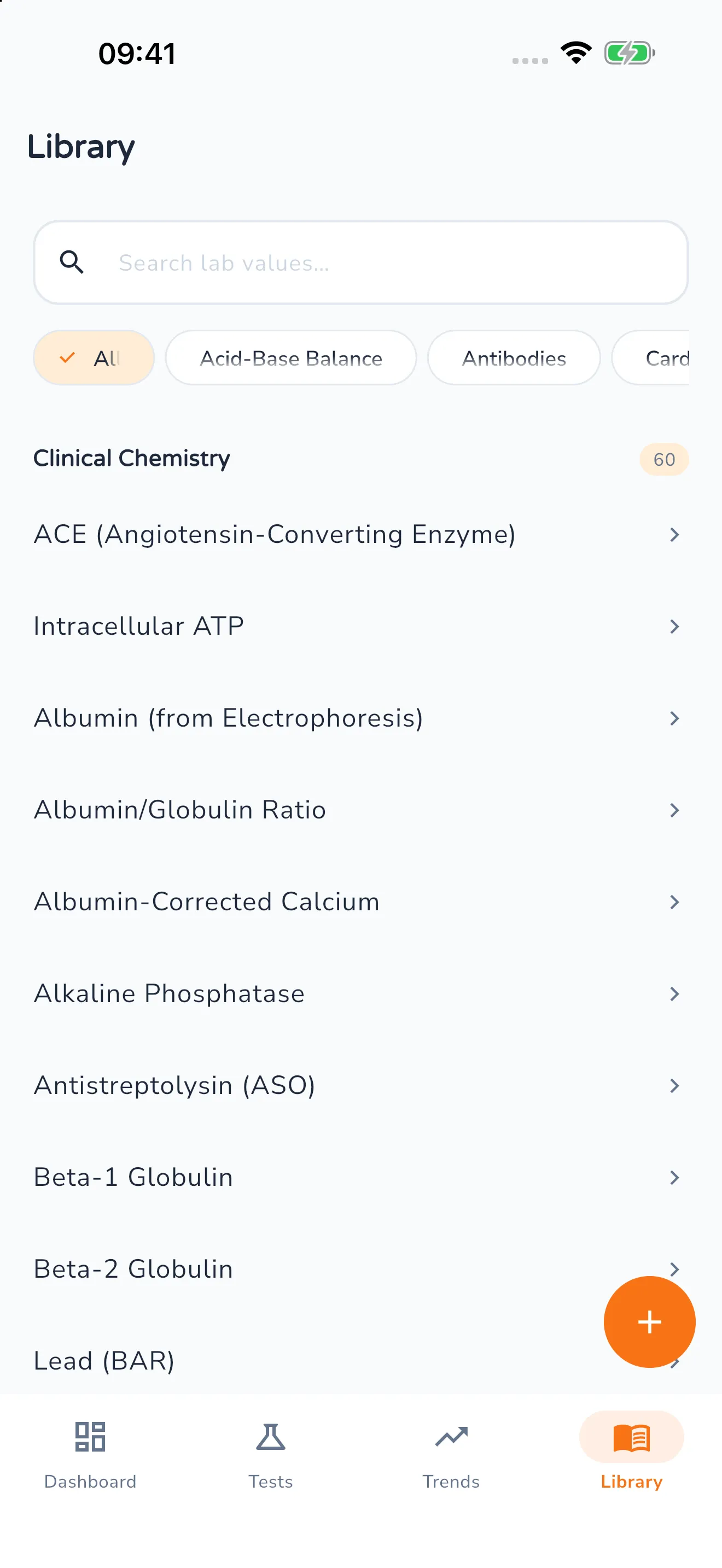
Library
A reference work for the values themselves – grouped and searchable.
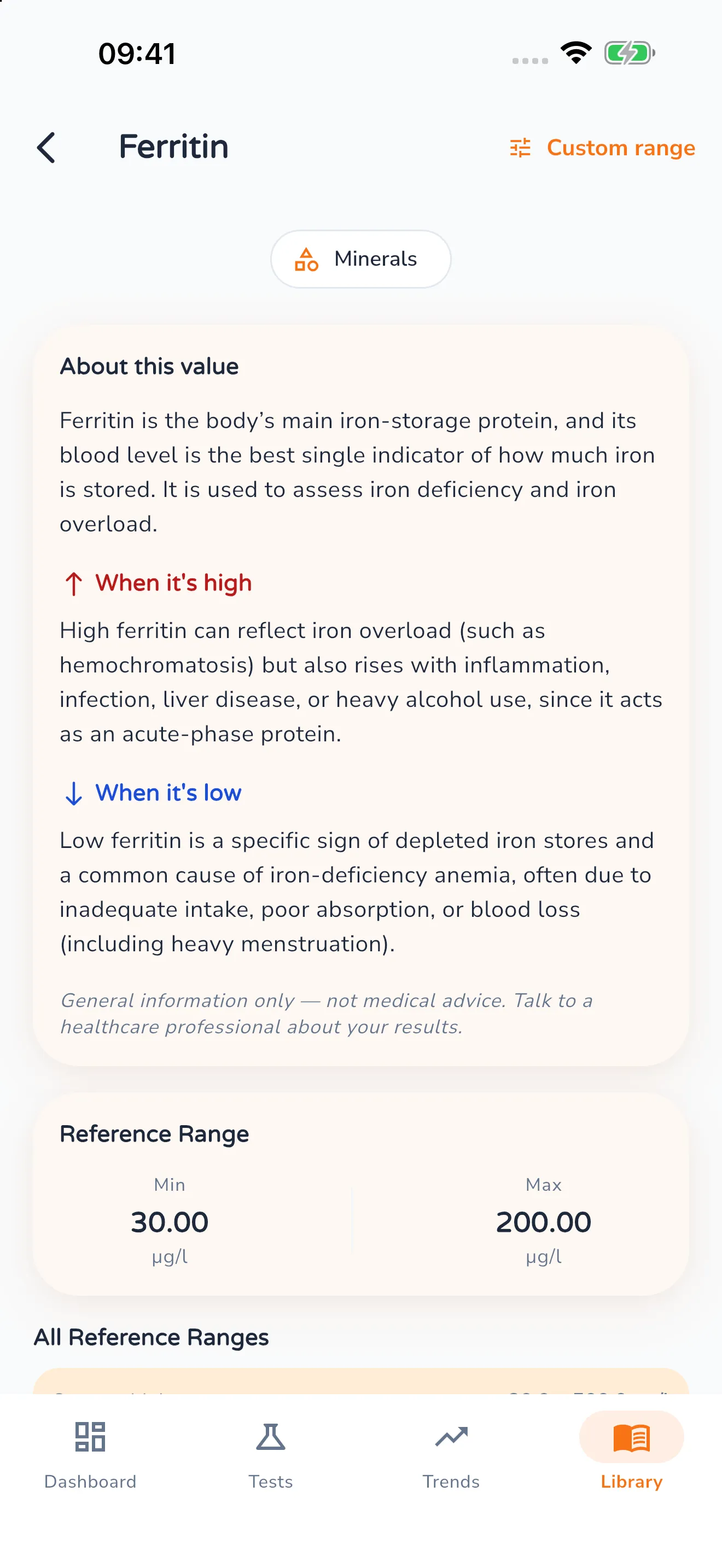
What a value means
What is being measured, and what high or low results can mean.
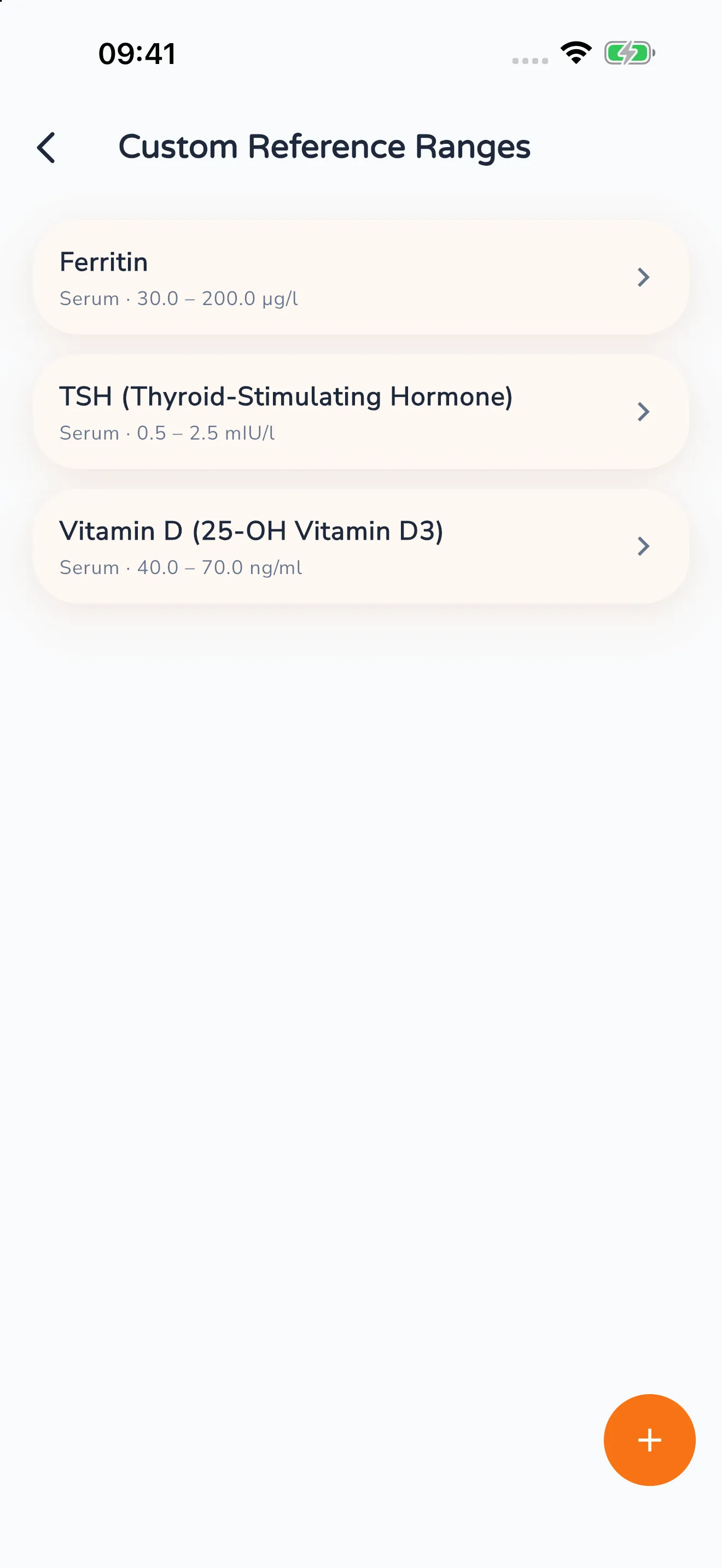
Custom reference ranges
When your lab gives different limits: set the range yourself, value by value.
Privacy
Your results stay in Germany
Blood work is about as personal as data gets. So here’s what happens to it, without the small print.
Servers in Germany
Your lab results sit on servers in Germany and are processed under the GDPR.
AI analysis in Germany
The AI that interprets your results also runs on German servers. Your data doesn’t leave the country for it.
Neither stored nor trained on
Whatever is passed to the analysis, we don’t keep it and we don’t use it to train AI models.
Exactly what is processed, and when, is set out in our privacy policy.
Features
Results that get understood, not just measured
What the app can do today — what’s still missing is further down.
The basics
Record and store lab results
Type them in, upload a report PDF or photograph the printout – you decide how your values get into the app.
Import by PDF or photo
Upload a report PDF or photograph the printout – Lab Mate recognises the values and enters them in order. You see what was recognised before anything is saved.
Colour-coded assessment
Blue, green or red – see at once which values sit in the normal range and where you should take a closer look.
Simple & intuitive
Clear design, quick navigation – the app suits people with no medical background just as well.
AI-assisted interpretation
Get an easy-to-follow read on your values – with no jargon at all.
Data security
Servers and AI analysis are in Germany and GDPR-compliant – your data belongs to you alone.
History & trends
Long-term history of every value
Follow how your blood work develops over time – laid out clearly and shown as a graph.
Trend analysis
Spot deviations, or steady development, early on thanks to automatic analysis.
Compare points in time
Set current values against earlier measurements – for more context and more clarity.
See the connections
See how your vitamin D relates to other parameters, for instance – with the AI helping you along.
What we’re working on
What Lab Mate can’t do yet
These features are planned but not in the app yet. Once they’re done, they move up to the features above.
- In progress
Export results as a PDF
Your lab results as a clear PDF – history and colour coding included.
- In progress
Share results with your doctor
Pass the summary on straight from the app, instead of recounting it from memory in the appointment.
- In progress
Reminders for follow-up appointments
If you want it, Lab Mate gets in touch when a follow-up is due.
How it works
Record. Interpret. Track.
Three steps — that’s all it takes to stay on top of things.
Record blood & lab results
Enter your values by hand or scan a report PDF or a photo – Lab Mate reads the values out of it.
Put in plain language
Lab Mate checks every value against its reference range, flags anything unusual in colour and explains in ordinary words what it says.
The trend at a glance
See how your values change over time – each one as its own curve, with the normal range behind it.
Getting started
Up and running in minutes
From signing up to your first interpreted result — here’s what to expect.
Download the app and create an account
Download Lab Mate for free from the App Store or Google Play and set up your account in a few taps.
Set up your profile
Add the basics such as age and sex. Those determine the reference ranges Lab Mate checks your values against.
Enter or import your lab results
Your choice: type them in, or scan a report PDF or a photo from the surgery. Lab Mate recognises many values automatically.
See the colour coding and the normal range
The moment you save, you see which values sit inside the normal range and which are above or below it – with a reference bar and a status for each one.
Run the analysis and understand it
One tap and Lab Mate puts your values in context. You get a clear read on them – no jargon, but plenty of moments where things click.
Follow the trend
Track your values over time and spot developments early – each one as its own curve with the normal range behind it.
Feedback
What testers say
Feedback from the closed beta before launch, translated from German — so these are not store reviews.
Lab Mate doesn’t just show me numbers, it explains what they mean in a way I understand. The analysis and the trend charts especially help me keep a better eye on my health.
Heike
After every blood test I enter the values into Lab Mate. The app doesn’t only show me whether something is unusual, it also explains what that might mean. I can see exactly how my blood work is developing.
Patrick
Pricing
A plan that fits
Lab Mate is free to try. Premium unlocks every feature — monthly, yearly or once and for all.
Monthly
Stay flexible.
Ideal for trying things out, and for anyone who’d rather take it month by month.
€3.99per month
Choose Premium- Everything in the free version
- Custom lab values and custom reference ranges
- AI-assisted analysis of your results
- Import by PDF or photo with value recognition
Cancel any time, to the end of the month
- Almost 50 % cheaper
Yearly
Save and get going.
Use every feature for a whole year – and save almost 50 % against the monthly plan.
€24.99per year
Choose Premium- Everything in the free version
- Custom lab values and custom reference ranges
- AI-assisted analysis of your results
- Import by PDF or photo with value recognition
Runs for 12 months, then cancellable to the end of the term
Lifetime
Pay once. Keep it for good.
Every premium feature, no subscription. For long-term users and health enthusiasts.
€79.99one-off
Choose Premium- Everything in the free version
- Custom lab values and custom reference ranges
- AI-assisted analysis of your results
- Import by PDF or photo with value recognition
No subscription — one payment, permanent access
The difference
What each plan includes
| What | Free | Premium |
|---|---|---|
| Record and store values manually | Unlimited | Unlimited |
| Library of 249 lab values in 16 categories | Full | Full |
| Colour-coded assessment: blue, green or red | Full | Full |
| History and trends per value | Full | Full |
| Custom lab values and custom reference ranges | Not included | Full |
| AI-assisted analysis of your results | Not included | Full |
| Import by PDF or photo with value recognition | Not included | Full |
Get the app
Lab Mate is here
Download the app for free, enter your latest lab report and see at a glance what sits inside the normal range.
- Free to download
- For iPhone, iPad and Android


Frequently asked
The questions that come up before the first entry
If yours isn’t here, you’ll find it in the full help section.
What exactly is Lab Mate?
Lab Mate is an app for recording your blood and lab results, making sense of them and following them over time.
For every value you get feedback that’s easy to follow – without the medical jargon. You can enter your values by hand or scan a report PDF or a photo, and Lab Mate reads the values out of it.
Is Lab Mate suitable if I have no medical background?
Yes. Lab Mate was built specifically to turn complicated lab results into something simple and readable.
Colour codes, normal-range markers and plain explanations help you make sense of your values – no prior medical knowledge needed.
What can Lab Mate’s AI analysis do?
The analysis puts your lab results in context – readably, individually, and on the basis of established medical reference values.
It points out deviations, shows how things develop over time and helps you make sense of changes. It explicitly does not replace a doctor’s diagnosis – but it does help you walk into the appointment better prepared.
What does Lab Mate cost?
Lab Mate can be used free of charge.
For free you record your values, use the library of 249 lab values, see the colour-coded assessment and follow the history. Custom lab values and reference ranges, the AI-assisted analysis and the import by PDF or photo come with a Premium subscription (monthly or yearly), or with a lifetime version you pay for once and keep.
Can I share my results with my doctor?
Not yet – the PDF export and sharing with doctors are still being built.
Until then you can open your values in the app and show them in the appointment. Once the export is finished, the PDF will contain a structured overview of your values including history and colour coding.
What sets Lab Mate apart from other health apps?
Lab Mate brings lab results, plain-language interpretation and history together in one app.
Unlike many pure tracking or medication apps, you get help with the substance – in a design that doesn’t make the whole thing more clinical than it needs to be.
Do I need a particular laboratory or surgery?
No – you can record lab results from any source, wherever they were taken.
GP, laboratory centre or home test: you enter the values manually, import a report PDF or photograph the printout. Lab Mate is independent of any laboratory or practice – you keep control of your data.
Lab Mate is no substitute for medical advice
Lab Mate documents and visualises your lab results and places them in the reference ranges on file. The app makes no diagnosis, gives no treatment advice and is not a medical device. Reference ranges differ by laboratory, age and sex. If you have symptoms or unusual results, please talk to your doctor.